Blog
GPT Image 2 vs Nano Banana 2: What's Different for Creators?
By MetaHill Tech · October 10, 2026
Both models reason before they render and both handle dense typography—but editing inputs and layout strengths diverge. Use this comparison to route briefs inside UltraPix: GPT Image 2.5 / GPT Image versus Nano Banana 2.1, with deeper prompt playbooks linked below.
Head-to-head snapshot
- Best for: GPT Image 2 — literal prompt following, mixed-script signage, infographics, draft-to-final detail passes. Nano Banana 2 — fast reasoning-guided layouts, vibrant color, multi-reference compositing, extreme aspect ratios.
- Text rendering: Both handle Latin and CJK when you quote strings and describe hierarchy. GPT Image 2 often wins on timetables and menu boards; Nano Banana 2 excels at posters and social frames with a few bold lines.
- Character consistency: Nano Banana 2 handles multi-person series when you reuse reference stills; GPT Image 2 favors single-scene fidelity and typography stress tests.
- Editing: Both support image-to-image; Nano Banana 2 is built for many reference stills in one brief.
- Real-world scenes: Nano Banana 2 responds well when prompts name districts, stations, or landmarks—always verify spelling in-app. GPT Image 2 leans on scene knowledge from the prompt itself.
For prompt craft, continue with photorealistic habits, Nano Banana 2 reasoning tips, and FLUX 2 MAX structure.
How each model feels in a creative workflow
GPT Image 2 rewards draft passes: lock composition at a modest size, fix typography, then run a high-detail pass for delivery. Longer, structured prompts beat keyword lists for mixed-script layouts.
Nano Banana 2 rewards the same art-director briefs: pick resolution for how close viewers will zoom, not how you word the scene. Optional deeper reasoning helps diagrams, mirror logic, and multi-label posters.
Neither model replaces the other. Campaign teams often route signage stress tests and infographic grids to GPT Image 2, while multi-reference compositing and real-place photography lean Nano Banana 2.
Shared stress test: Tokyo metro signage
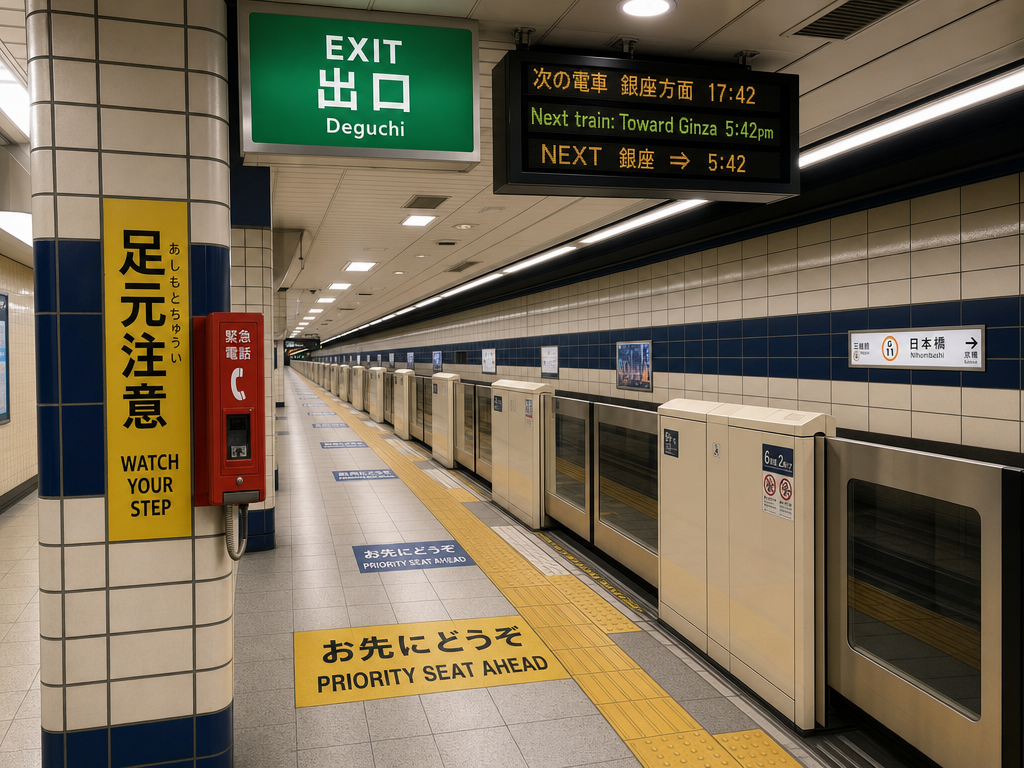
The prompt below mixes Latin, kanji, hiragana, and timetable logic—use it to compare spelling, placement, and scene realism when both models are available in your picker.
Tokyo metro multilingual signage
Prompt
A photorealistic interior view of a Tokyo metro station platform during evening rush hour, looking down the platform from a wide-angle perspective. The exit sign overhead reads 'EXIT' in white sans-serif on green, with the kanji '出口' directly beneath in equal weight, and the romaji 'Deguchi' in smaller letters below that. To the left, a yellow caution panel reads '足元注意' in vertical kanji with the smaller hiragana 'あしもとちゅうい' to its right, and the English 'WATCH YOUR STEP' beneath both. A digital information board mounted on the ceiling cycles between three lines: '次の電車 銀座方面 17:42', 'Next train: Toward Ginza 5:42pm', and 'NEXT 銀座 ⇒ 5:42'. The platform floor has yellow tactile paving with English 'PRIORITY SEAT AHEAD' and Japanese 'お先にどうぞ' painted in alternating sections. Tiled walls in cream and dark blue, fluorescent lighting, a single red emergency phone box mounted on a column with the kanji '緊急電話' above it. No people in the frame. Sharp typography, all text legible at standard zoom, characters proportionally accurate.
When to reach for each model
Pick GPT Image 2 when you need custom dimensions, draft-to-final detail passes, or dense mixed-script layouts. Link: UltraPix GPT Image hub.
Pick Nano Banana 2 when you need many reference images, real-place photography, or extreme aspect presets for banners and vertical scroll. Link: Nano Banana 2.1 hub.
Use UltraPix to A/B prompts before you publish.
Scenario routing for small teams
Packaging mockups with ingredient lists — Start on GPT Image 2 when every line must spell correctly at medium quality, then upscale. Use Nano Banana Pro if the layout needs art-directed lighting and multiple type styles on one hero.
Location-based tourism posts — Nano Banana 2 responds well when prompts name real districts, stations, or landmarks; verify signage still reads correctly when zoomed.
Character sheets for serial content — Nano Banana 2 keeps multiple people consistent when you reuse reference stills; GPT Image 2 may still win on mixed-script posters. Run the Tokyo metro prompt on both models in UltraPix and compare.
Volume social drafts — Nano Banana 2 favors quick iteration at standard size; GPT Image 2 draft passes let you explore layout before a final high-detail render.
Neither choice is permanent inside UltraPix: switch models per generation, keep prompts in a shared doc, and link internally to Nano Banana Pro workflows when typography becomes the bottleneck.
Run these prompts in UltraPix
Paste a prompt and generate in seconds with text-to-image and image-to-image.

FAQ
- What is the main difference between GPT Image 2 and Nano Banana 2?
- GPT Image 2 emphasizes draft-to-final detail for hard layouts and mixed-script type. Nano Banana 2 emphasizes reasoning-guided composition, reference-heavy edits, and fast social frames.
- Which is better for multilingual signage?
- Both are strong; run the Tokyo metro prompt in each model available in UltraPix and judge spelling, layout logic, and photorealism for your channel.
- Where can I learn prompting for each model?
- Nano Banana 2 → reasoning guide and 2.1 page. GPT Image → GPT Image hub plus photorealistic habits.
Get UltraPix
Download UltraPix to try text-to-image, background removal, and upscale in one app.