
Blog
How to Use Nano Banana Pro Like a Pro
By MetaHill Tech · October 10, 2026
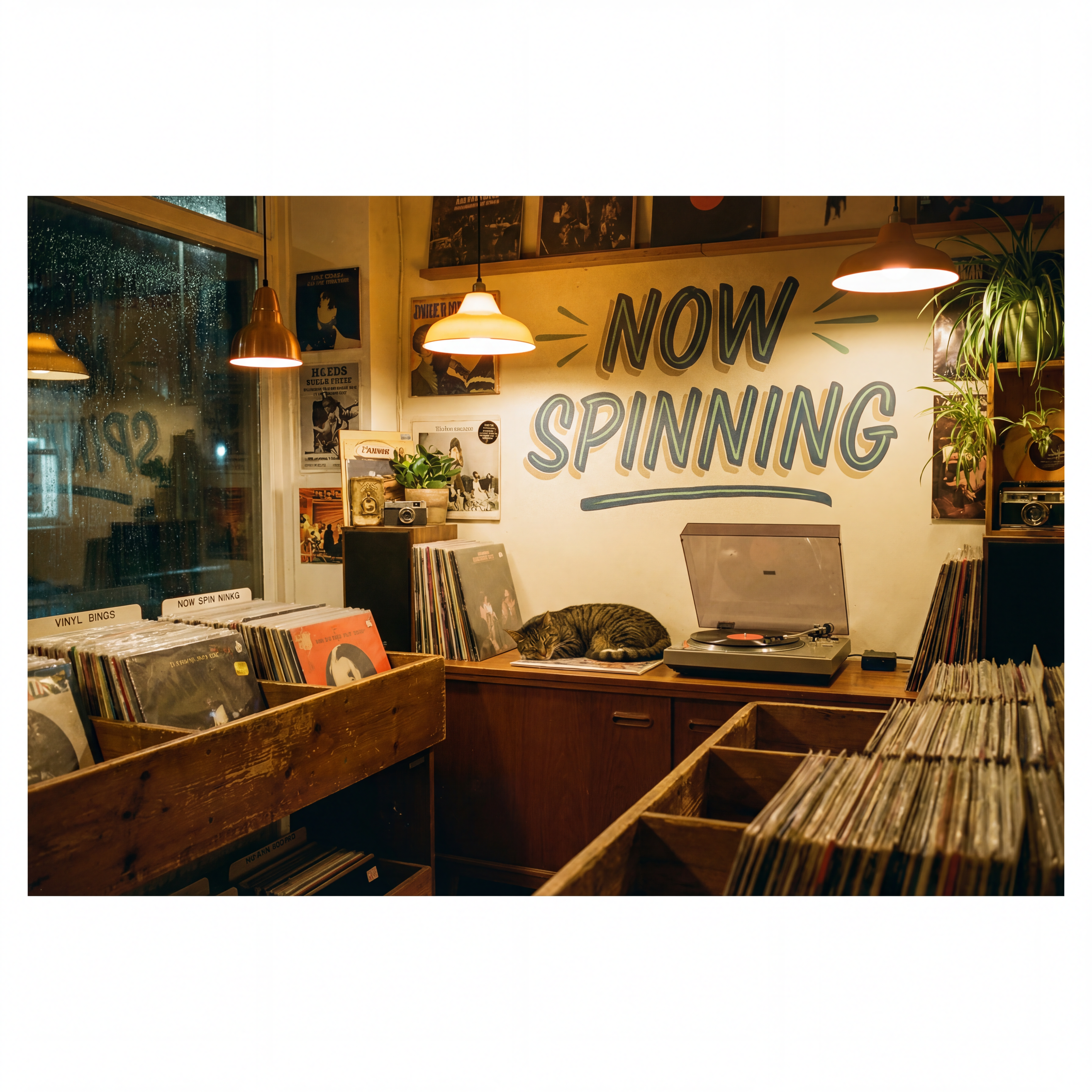
Nano Banana Pro excels when you describe scenes the way a photographer would: subject, light, lens, materials, and quoted type. This guide is for UltraPix. Open UltraPix, pick a Nano Banana Pro–class model, and use the workflows below.
How to try Nano Banana Pro with UltraPix
Open UltraPix and sign in. From the home screen, choose Text to image (or Image to image if you already have a reference photo). In the model list, select Nano Banana Pro (or the closest Pro-class image model shown in your build).
Paste your prompt in full sentences (see the library in our Nano Banana Pro prompting guide). Set aspect ratio to match your deliverable: 1:1 for avatars, 4:5 for feed posts, 9:16 for stories. Start at standard resolution while you tune wording; switch to 2K/4K only when composition and typography look correct.
Review the result, then iterate in place: duplicate the prompt, change one line (light direction, wardrobe, headline text), and regenerate. For localized fixes, open Image to image, upload the last render, and describe a single change while naming what must stay—same pattern as Lock/Change in the prompting guide. Upscale or remove backgrounds using built-in tools; see AI photo upscaler and background removal.
Picture the whole scene; nail on-image text
Replace keyword lists with relationships: who is in frame, what they are doing, where light enters, which materials catch that light. Borrow camera vocabulary—35mm, shallow focus, low angle—when you need framing control.
For packaging and signage, put exact words in quotes and specify type styles (condensed sans, copper foil, italic script). Nano Banana Pro is especially strong at legible multi-line layouts when you describe hierarchy top to bottom.
Record shop scene
Prompt
A photorealistic eye-level photograph of a cozy independent record shop after closing time. Rows of vinyl sit in worn wooden bins, and a large hand-painted mural behind the counter reads 'NOW SPINNING' in bold mid-century lettering. A tabby cat sleeps on the counter beside an open turntable, with warm tungsten light and faint dust catching in the air. Shot on a 35mm lens with natural film grain.
Cold brew can with layered type
Prompt
A close-up product shot of a matte black cold-brew coffee can standing on a concrete surface, soft studio lighting. The front of the can reads "MIDNIGHT ROAST" across the center, set in a bold condensed sans-serif, all caps, in warm copper foil. Directly beneath it, the line "Small-Batch Cold Brew · 250ml" in a thin, evenly-spaced uppercase sans-serif, same copper tone but smaller. Near the base, "Brewed in London" in a delicate italic script.
Macro fruit with chiaroscuro
Prompt
Photograph a single ripe pomegranate split open on a dark slate surface, its seeds glistening with juice. Light it with hard chiaroscuro from one softbox at camera left, so the right side of the fruit falls into deep shadow. Shoot on a macro lens at f/2.8 with a shallow plane of focus on the front seeds. Grade the color toward rich crimson with a touch of 1970s Kodachrome warmth.
Edit loop in the app
Treat the first render as a draft. Upload it to image-to-image, name unchanged regions (background bokeh, logo text, hand pose), and request one adjustment—recolor a prop, swap wardrobe, repaint an object. For multi-reference blends, attach the base photo plus a style reference if your build supports multiple inputs.
Compare Nano Banana Pro with faster siblings in GPT Image 2 vs Nano Banana 2 and Nano Banana 2.1 on UltraPix. Fundamentals live in how to write AI image prompts.
Common fixes without starting over
Misspelled headline — Shorten the on-image copy to one line, regenerate at standard resolution, then add secondary lines in a second pass once spelling locks.
Product drift on edit — Your Lock block was incomplete. Re-run image-to-image and paste the full Lock list from the prompting guide, including grade and text placement.
Flat lighting — Add a single modifier ("large softbox camera left, white reflector right") instead of "studio lighting."
Wrong aspect crop — Change ratio before regenerating; cropping after the fact often clips quoted type.
When typography is the deliverable, export PNG from UltraPix and avoid heavy compression before posting—JPEG can muddy small caps on social feeds.
Run these prompts in UltraPix
Paste a prompt and generate in seconds with text-to-image and image-to-image.

FAQ
- Do I need a desktop tool to use Nano Banana Pro?
- No. UltraPix runs Nano Banana Pro–class models on phone with the same prompt discipline—full sentences, quoted text, and one change per edit pass.
- When should I raise resolution to 4K?
- After composition, typography, and lighting look correct at standard size. Upscaling early wastes time on prompts that still need wording fixes.
- How is this different from the Nano Banana Pro prompting guide?
- The prompting guide lists templates and Lock/Change syntax. This article focuses on tapping those patterns inside UltraPix's text-to-image and image-to-image flows.
Get UltraPix
Download UltraPix to try text-to-image, background removal, and upscale in one app.